
Powershare home backup works with two Tesla chargers: the Universal Wall Connector and Wall Connector 3. A Gen 2 Wall Connector, the J1772-plug Wall Connector, a Mobile Connector on a NEMA 14-50 outlet or any non-Tesla charger won’t run home backup, and whichever compatible unit you have must sit on a backed-up circuit, on the same Wi-Fi and Tesla energy site as Powerwall 3.
One more wrinkle: if you drive a Cybertruck and go the Powershare Gateway route (usually partial backup for your essential loads), Tesla lists only the Universal Wall Connector. Below is how to tell which charger you have, what the wiring has to look like, and when we recommend replacing it.
Compatibility at a glance
| Charger | With Powerwall 3 | With Powershare Gateway (Cybertruck) | How to spot it |
|---|---|---|---|
| Universal Wall Connector | Yes | Yes (required) | Tesla handle plus a J1772 adapter that docks into the side of the unit |
| Wall Connector 3 (Gen 3) | Yes | No | Tesla-plug cable only, no docked adapter; sets up in the Tesla app over Wi-Fi |
| Gen 2 Wall Connector | No | No | Part number ending in -E; older unit with no app setup |
| Tesla J1772 Wall Connector | Not listed by Tesla | Not listed by Tesla | J1772 plug on the cable, no Tesla handle |
| Mobile Connector on NEMA 14-50 | No | No | Portable cord plugged into a wall outlet |
| Non-Tesla chargers | No | No | Any other brand |
Why the names are confusing
- “Gen 3” and “Wall Connector 3” are the same family. Tesla’s installer documents say Gen 3 Wall Connector; its support page and owner’s manual say Wall Connector 3.
- “Wall Connector” on its own usually means the Tesla-plug unit. The Universal Wall Connector is the one with the built-in J1772 adapter that charges any EV.
- Gen 2 is not “almost Gen 3.” It is an older design, and Tesla doesn’t list it for Powershare at all.
- Go by Tesla’s Powershare support page. It lists the Universal Wall Connector for Model 3 and Model Y with Powerwall 3, as well as Cybertruck.
How to identify the charger on your wall
- Look at the side of the unit. A J1772 adapter docked into the side means it’s a Universal Wall Connector.
- Read the label. Universal Wall Connector part numbers start 1734412-02 or 1734412-03. A Gen 2 part number ends in -E.
- Open the Tesla app. Wall Connector 3 and Universal Wall Connector units connect to Wi-Fi for updates and access control. If yours has never shown up in the app and can’t, it’s probably a Gen 2.
- Check your paperwork. The install invoice or order receipt usually names the model.
- Still unsure? Send us a photo of the unit and its label. We’ll tell you which one it is.
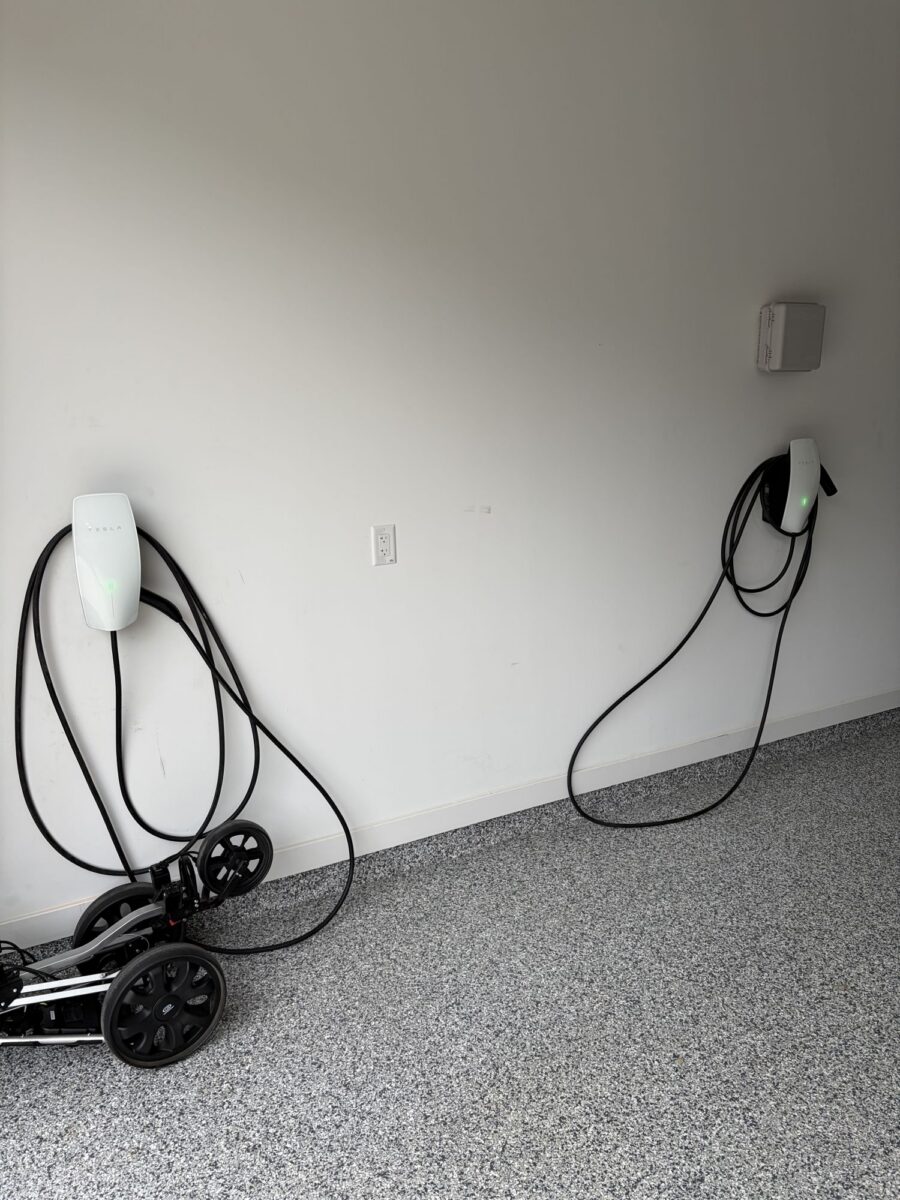
The model is only half of it: five wiring rules
- Backed-up circuit. Tesla’s install manual says the Wall Connector breaker must be inside the backup circuit. In a partial-backup setup, that usually means the charger breaker lives in the backup panel, not the main panel.
- Same Wi-Fi network. Powerwall and the Wall Connector must be on the same Wi-Fi network. The Universal Wall Connector uses 2.4 GHz Wi-Fi, so a weak signal in a detached garage is worth fixing before install day. After install, Tesla may also need to activate Powershare, which can take a little while.
- Same energy site, paired. Both must be registered to the same Tesla energy site and paired. A charger registered to an old address or a different account is a common snag.
- No communication wire with Powerwall. In a Powerwall system, Tesla says not to run communication wiring between the Wall Connector and Powerwall. It all happens over the network.
- Its own dedicated circuit. The Wall Connector used for Powershare needs a circuit of its own. Two chargers daisy-chained on one shared circuit with power sharing won’t work for Powershare.
Our standard: hardwired, copper, 48 A on a 60 A breaker where the panel allows
Powershare can deliver up to 11.52 kW from the car at 240 V. That is 48 A, and Tesla’s owner’s manual notes that the charging station in your home may limit how much power the car can send. A Wall Connector set to a lower current caps that output for charging and backup alike.
So our default is a hardwired Wall Connector on a 60 A breaker set to 48 A, with copper wire sized for the 60 A breaker on its own circuit. Hardwired means no receptacle to wear out or overheat. Some panels can’t carry a 60 A circuit alongside everything else, and in that case we size the circuit to what a load calculation supports and tell you what that means for charging speed. You can rough out your own numbers with our panel load tools.
When you need a new Wall Connector
- You have a Gen 2 Wall Connector, a J1772 Wall Connector or a non-Tesla charger.
- You charge on a Mobile Connector plugged into a NEMA 14-50 or other outlet.
- You drive a Cybertruck, want the Powershare Gateway path, and have Wall Connector 3 (the Gateway path needs the Universal Wall Connector).
- You already have a Universal Wall Connector or Wall Connector 3 on a circuit we can bring onto the backup side.
- It is on Wi-Fi and in your Tesla app, or can be.
If your charger qualifies but sits on a non-backed-up circuit, we usually move the circuit rather than the charger. Already own Powerwall 3? See how to add Powershare to an existing Powerwall 3. Not sure your car qualifies? Run the 30-second Powershare check. Cybertruck owners deciding between equipment paths should read Powershare Gateway or Powerwall 3. Still deciding on backup at all? Compare Powershare vs a standby generator. For the full picture see our Tesla Powershare installation page.
Not sure which charger you have?
Send photos of your Wall Connector, its label and your electrical panel. We usually quote the same day from photos, our own electricians pull the permit and meet the inspector, and if the inspection fails, we fix it.
Wall Connectors and Powershare: FAQ
Which Wall Connector do I need for Powershare?
With Powerwall 3, Tesla supports the Universal Wall Connector or Wall Connector 3. For a Cybertruck with a Powershare Gateway and no battery, Tesla lists the Universal Wall Connector only.
Does my Gen 2 Wall Connector work with Powershare?
No. Tesla does not list the second-generation Wall Connector for Powershare. Gen 2 units have part numbers ending in -E and need to be replaced with a Universal Wall Connector or Wall Connector 3.
Can I use Powershare with a Mobile Connector on a NEMA 14-50 outlet?
Not for home backup. Powershare Home Backup needs a Universal Wall Connector or Wall Connector 3. A Gen 3 Mobile Connector with the Tesla Outlet Adapter can turn the car’s charge port into a 120 V outlet, but that powers devices, not your house.
Does the Wall Connector have to be on a backed-up circuit?
Yes. Tesla’s install manual says the Wall Connector breaker must be inside the backup circuit. If your charger is fed from a part of the panel that goes dark in an outage, the car cannot feed the home through it.
Why does Charge Pro install Wall Connectors at 48 A?
Powershare can deliver up to 11.52 kW at 240 V, which works out to 48 A, and Tesla notes the home charging station may limit that output. Where the panel allows, we hardwire the Wall Connector at 48 A on a 60 A breaker with copper wire sized for it (aluminum wire or 6 AWG Romex gets replaced), so the charger is not the bottleneck.
Is the Tesla J1772 Wall Connector compatible with Powershare?
Tesla’s Powershare requirements name only the Universal Wall Connector and Wall Connector 3, so we treat the J1772-plug Wall Connector as not compatible. If you drive a Tesla and want Powershare, plan on a Universal Wall Connector.
I have two Teslas. Can both be used for Powershare?
We’re confirming this with Tesla. What we know: the charger used for Powershare needs its own dedicated circuit, so two Wall Connectors daisy-chained on one shared circuit won’t work for it. If you have two Teslas, ask us when you send your photos and we’ll tell you what Tesla supports for your setup.
What if my Wi-Fi goes down during an outage?
It depends on your setup. With Powerwall 3, the Wall Connector and Powerwall talk over your home Wi-Fi, so we put your router and modem on a backed-up circuit to keep the Wi-Fi on when the grid goes down. With a Cybertruck and Powershare Gateway, the Gateway and Wall Connector are wired together. We’re confirming with Tesla exactly how each setup behaves if your internet goes down, so we put the router and modem on a backed-up circuit either way.
Sources
- Powershare support page (Tesla)
- Cybertruck Owner’s Manual: Powershare Home Backup (Tesla)
- Installation Overview: Powerwall System with Wall Connector (Tesla Energy Library)
- Universal Wall Connector datasheet (Tesla Energy Library)
- Universal Wall Connector (Tesla Shop)
- Second Generation Wall Connector (Tesla)