
With just a Powershare Gateway, a Cybertruck usually backs up part of your home: we move your key circuits into the Gateway and the rest of the house stays off. Whole-home backup usually only works on a smaller service, around 125 A. If you want the whole house on, that’s what Powerwall 3 is for. It runs the home on its own, keeps it running when the truck is gone, and the truck tops it up. With Powerwall 3 you don’t need a separate Powershare Gateway, because Powerwall’s own Gateway 3 does that job.
We were among the first in the US to install Cybertruck Powershare, and we’ve installed plenty of both setups since. Here is how the two paths really differ day to day, and how to choose.
The two paths side by side
| Powershare Gateway (no battery) | Powerwall 3 + Cybertruck | |
|---|---|---|
| What’s installed | Powershare Gateway plus Universal Wall Connector | Powerwall 3 with Gateway 3, plus Universal Wall Connector or Wall Connector 3 |
| At the start of an outage | Brief loss of power while the home islands and the truck takes over | Powerwall 3 picks up the home; the truck isn’t needed for the switchover |
| When the grid returns | Home may lose power for several seconds as the truck stops | Switches back automatically |
| How much of the house | Usually key circuits only. Whole home mostly on smaller services, around 125 A | Whole home. Our standard package is two Powerwall 3 |
| Truck leaves | Unplugging stops Powershare; the home has no backup | Powerwall 3 keeps running the home |
| Truck outlets during backup | Cabin and bed AC outlets disabled | Disabled while the truck is powering the home |
| Solar | Compatible; extends backup | Compatible; solar can charge Powerwall 3 during an outage |
| Daily value without an outage | Charging only | Battery storage every day; Austin Energy customers may look at its Power Partner Battery program |
| Cost | Tesla: about $1,950 hardware, about $2,000 to $4,000 install | Quoted per home |
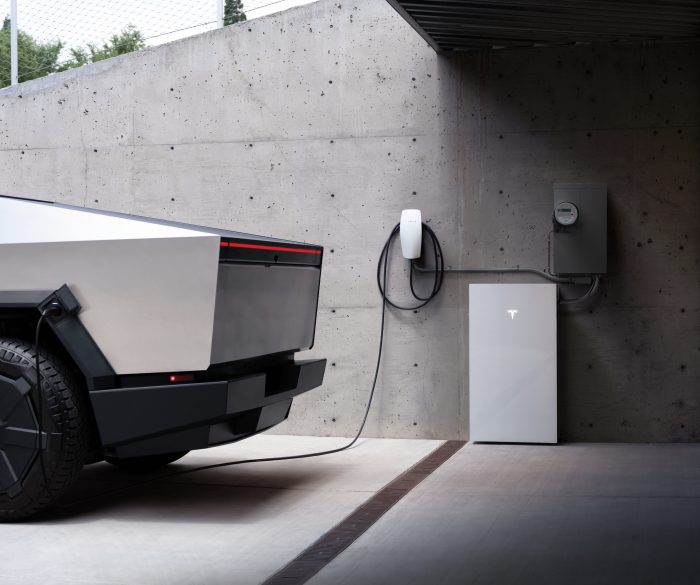
Path 1: Powershare Gateway, no battery
The Gateway is the switch that separates your home from the grid in an outage. The truck connects through a Universal Wall Connector; Tesla lists that model specifically for the no-battery setup.
- A short blackout at the start. Tesla’s owner’s manual says your home may lose power briefly when the grid first drops.
- Another one at the end. When grid power returns, the home may lose power for several seconds as the truck stops. You get a notification before it happens.
- Truck outlets are off. While the truck powers the home, its cabin and bed AC outlets are disabled.
- The truck has to stay plugged in. Without Powerwall, unplugging the truck ends Powershare. Powershare also stops at the discharge limit you set in the Tesla app.
- Usually not the whole house. On most homes we pick the circuits that matter most, like the fridge, lights, Wi-Fi and one AC, and move them into the Gateway. The big loads stay off during an outage.
If the truck is home most nights, outages are short and backing up the basics is enough, this is the smaller install.
Path 2: Powerwall 3 plus the truck
Since Tesla’s September 2026 update, Cybertruck works natively with Powerwall 3. When the grid drops, the system islands automatically and Powerwall 3 runs the home. Our standard package is two Powerwall 3 (27 kWh and 23 kW continuous); one Powerwall 3 (13.5 kWh, 11.5 kW) works too, it just runs out sooner. Tesla describes Powerwall backup as seamless. When Powerwall gets low, the truck powers the home and recharges Powerwall, then stops once Powerwall is full. Tesla estimates the truck adds more than three days of backup on top of Powerwall at 30 kWh a day.
- Backup doesn’t depend on the truck being home.
- Solar can recharge Powerwall 3 during an outage.
- No separate Powershare Gateway; Powerwall 3’s own Gateway 3 does the switching.
- Tesla doesn’t combine Powerwall with Powershare Grid Support. If you have both, credits come from Powerwall programs only.
Thinking about Powerwall later? Start with it
With Powerwall 3, its own Gateway 3 does the switching, so the Powershare Gateway isn’t used. If you start with a Powershare Gateway and add Powerwall 3 later, the Powershare Gateway gets swapped for a Gateway 3 and part of the first install gets redone. That’s why Tesla recommends going with Powerwall first if you think you’ll want it.
How to choose
Choose the Gateway if…
Backing up your key circuits is enough, the truck is home most nights, a short blink at the start of an outage is fine, and you don’t plan to add a home battery.
Choose Powerwall 3 if…
You want the whole house backed up, power when the truck is away, no blink when the grid drops, solar now or later, or you might add a Model 3 or Model Y with Powershare.
Not sure?
If there is any chance you’ll want a battery within a few years, Tesla’s own advice points to Powerwall 3 first.
What we’ve learned installing Cybertruck Powershare
We were among the first in the US to install Tesla’s car-to-home system, and our master electrician still goes out on installs. A few things come up on almost every job. The Wall Connector location matters more than people expect, because the truck needs to reach it nose-in or tail-in every night. Wi-Fi in a detached garage is often weaker than owners think. And most installs take one day: we schedule the power shutoff with the utility and install everything that day, while a complex job occasionally takes two. After install, Tesla may need to activate Powershare on your truck, which can take a little while. Our Powershare install lessons go deeper.
Related reading: which Wall Connector works with Powershare, adding Powershare to an existing Powerwall 3, Powershare vs a standby generator, and for Model 3 or Model Y drivers in the house, the 30-second Powershare check. Everything we install is on our Tesla Powershare installation page.
Gateway or Powerwall 3? Let’s look at your home
Send photos of your electrical panel, meter and where the Cybertruck parks. We usually quote both paths the same day from photos. Financing is available on every quote.
Cybertruck Powershare: FAQ
Can a Cybertruck back up my whole home without Powerwall?
Sometimes. With just a Powershare Gateway, most homes get partial backup: we move the key circuits into the Gateway and the big loads stay off. Whole-home backup without a battery usually only works on a smaller service, around 125 A. For whole-home backup on a typical house, add Powerwall 3.
I already have a Powershare Gateway. Can I add Powerwall 3?
Yes. Powerwall 3 comes with its own Gateway 3, which takes over the job, so we swap your Powershare Gateway for the Gateway 3 when Powerwall goes in. Your Cybertruck then backs up the house together with Powerwall 3.
How much does the Cybertruck Powershare Gateway setup cost?
Tesla says the hardware typically costs about 1,950 dollars, less if compatible equipment is already installed, and installation typically runs about 2,000 to 4,000 dollars depending on configuration and complexity. We quote each home after reviewing photos.
Will my lights go out when the grid fails with the Gateway setup?
Briefly. Tesla’s owner’s manual says the home may lose power briefly when the grid first drops, and for several seconds when the truck stops supplying power as the grid returns.
Can I use the Cybertruck’s outlets while it powers my house?
No. Tesla says the cabin and cargo bed AC outlets are disabled while the truck is powering the home.
I might add Powerwall later. Should I start with the Gateway?
Tesla recommends installing Powerwall first if you plan to add it. Starting with the Powershare Gateway and adding Powerwall later means swapping the Gateway and redoing part of the install.
What happens if I drive the Cybertruck away during an outage?
With the Gateway setup, unplugging the truck stops Powershare and the home loses backup. With Powerwall 3, the battery keeps running the home on its own and the truck tops it up when it returns.
Sources
- Powershare support page (Tesla)
- Powershare (Tesla)
- Cybertruck Owner’s Manual: Powershare Home Backup (Tesla)
- Powershare System Installation Manual: System Operation (Tesla Energy Library)
- Installation Overview: Powerwall System with Wall Connector (Tesla Energy Library)
- Tesla Launches Vehicle-to-Home With Powerwall in Update 2026.27.10 (Not a Tesla App, Sep 19, 2026)
- Powerwall support (Tesla)